
Searching for MEV profit opportunities often requires tedious blockchain monitoring and analysis. In this tutorial, I’ll describe how to automate this process using the mevlog-rs MCP interface and the OpenClaw agent. We’ll use a secure HTTPS connection and Telegram chat for communication. We’ll also discuss the pros and cons of using OpenClaw vs. a manual MCP integration.
Initial setup and RPC requirements
I don’t think the world needs another article on a basic OpenClaw setup. Any tutorial on running OpenClaw with a Ubuntu VPS should work. I will assume you already have an OpenClaw integration with a communication interface, such as Telegram, configured.
For an MCP integration, you’ll need an LLM agent configured and running locally. For the rest of this article, we will use the Claude Code CLI.
An optional but useful prerequisite for this tutorial is running a Geth full node on the same machine as OpenClaw. Local node offers significantly better performance for scanning larger block ranges. You can also use a premium RPC endpoint, e.g., from Alchemy. But if you want a quick and easy way to test this setup, you can also use the built-in ChainList integration, which automatically selects the fastest free RPC endpoint. But, please remember that free RPC endpoints are often throttled, don’t provide access to older data, and disable EVM tracing features.
Configuring an MCP server with mevlog-rs
Let’s start with a less “magical” setup. We will first configure a local MCP server and later a remote one to enable querying blockchain data by simply talking to your LLM agent. Full reference is in the mevlog-rs MCP docs.
First, install an mevlog-rs CLI with the MCP feature enabled:
cargo install mevlog --features mcp
Start by verifying if basic querying works:
mevlog search -b latest --rpc-url=$ETH_RPC_URL
You should see JSON output with txs from the recent block.
Now run a mevlog MCP server locally:
mevlog mcp --rpc-url=$ETH_RPC_URL
Next, configure it with your Claude Code instance:
claude mcp add --transport http mevlog http://localhost:6671
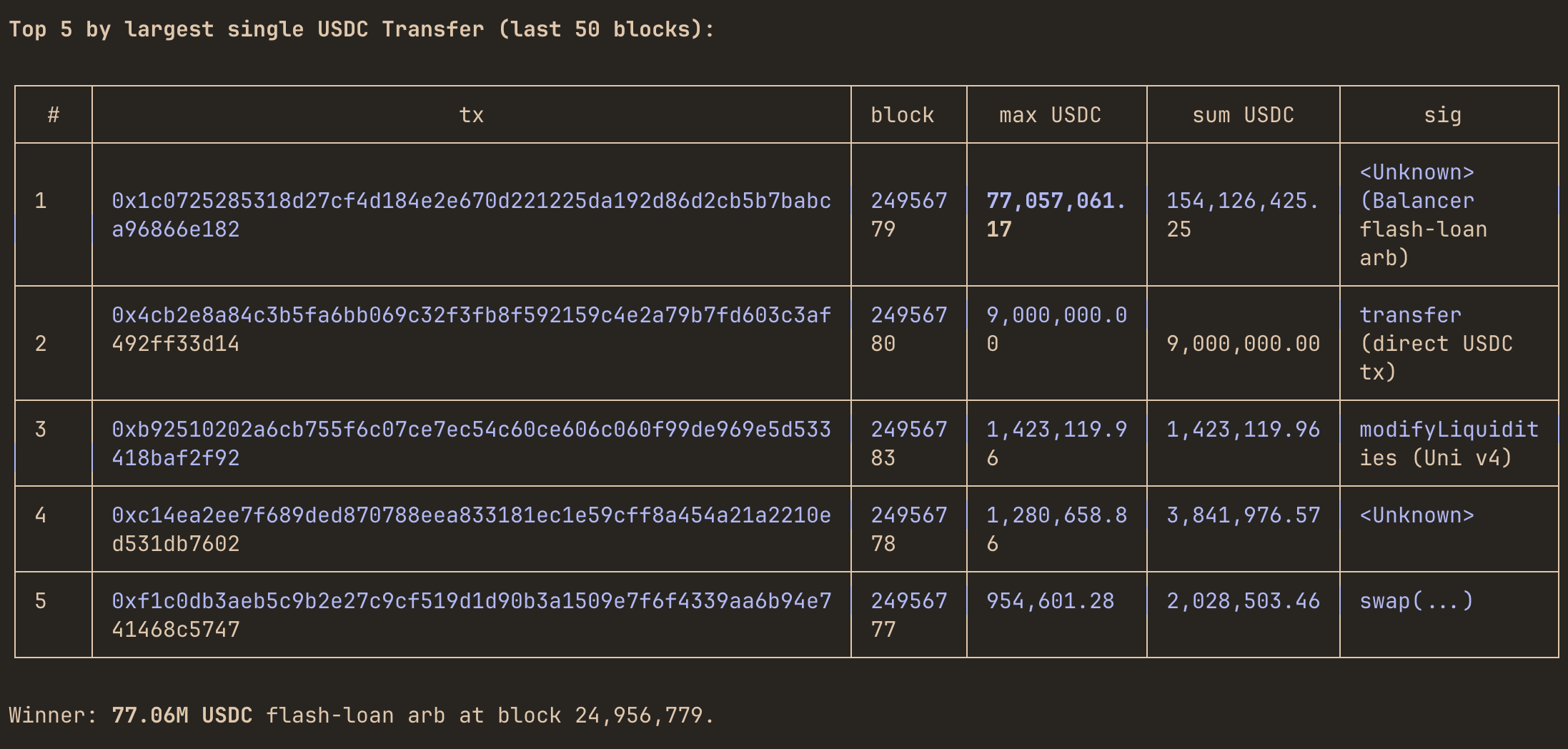
That’s it! You can query blockchain through an LLM interface by just asking questions like:
- query the last 50 blocks for transactions that transferred PEPE (
0x6982508145454ce325ddbe47a25d4ec3d2311933) token - find transactions that transferred over 100k USDC (
0xa0b86991c6218b36c1d19d4a2e9eb0ce3606eb48) in the last 200 blocks - which tx transferred the most DAI (
0x6b175474e89094c44da98b954eedeac495271d0f) in the last 6 hours
etc.
Configuring a remote MCP endpoint for better RPC performance
The above setup assumes that the mevlog CLI executes on your local machine. For production-like deployments, this is usually not optimal. The largest bottleneck of querying blockchains is downloading the data. mevlog uses caching extensively, so repetitive queries against the same block ranges will be significantly faster, but initial data must be downloaded over the wire.
For the best download performance, I recommend a proprietary full node. But you’re likely not run it in a local network but on an external VPS. To configure mevlog with an external node, you’ll need an authenticated HTTPS gateway using NGINX. So let’s do it now.
I won’t elaborate on configuring SSH access or running a full node on a proprietary VPS. Check my other tutorial for detailed info on how to do it.
To expose your MCP endpoint externally, you’ll need a similar nginx config:
server {
    listen 80;
    listen [::]:80;
    server_name mcphost.com;
    return 301 https://$host$request_uri;
}

server {
    listen 443 ssl;
    listen [::]:443 ssl;
    server_name mcphost.com;

    ssl_certificate /etc/nginx/ssl/mcphost.crt;
    ssl_certificate_key /etc/nginx/ssl/mcphost.key;
    ssl_protocols TLSv1.2 TLSv1.3;
    ssl_session_cache shared:SSL:10m;
    ssl_session_timeout 1d;

    location = /mcp {
        proxy_pass http://127.0.0.1:6671/mcp;
        proxy_http_version 1.1;
        proxy_set_header Host $host;
        proxy_set_header X-Real-IP $remote_addr;
        proxy_set_header X-Forwarded-For $proxy_add_x_forwarded_for;
        proxy_set_header X-Forwarded-Proto https;
        proxy_set_header Connection "";
        proxy_buffering off;
        proxy_request_buffering off;
        chunked_transfer_encoding on;
        proxy_read_timeout 3600s;
        proxy_send_timeout 3600s;
    }

    location = /.well-known/oauth-authorization-server {
        proxy_pass http://127.0.0.1:6671/.well-known/oauth-authorization-server;
        proxy_http_version 1.1;
        proxy_set_header Host $host;
        proxy_set_header X-Forwarded-Proto https;
    }

    location = /.well-known/oauth-protected-resource {
        proxy_pass http://127.0.0.1:6671/.well-known/oauth-protected-resource;
        proxy_http_version 1.1;
        proxy_set_header Host $host;
        proxy_set_header X-Forwarded-Proto https;
    }
}
I usually use a Cloudflare proxy and origin certificates to configure a secure SSL connection. Alternatively, you can use Certbot. BTW, if you already have an OpenClaw running on your VPS, you can ask him to configure it; he’ll know what to do.
Now start the authenticated MCP process on a VPS:
MEVLOG_MCP_AUTH_TOKEN=mcp_password mevlog mcp --rpc-url=$ETH_RPC_URL --host=127.0.0.1
and configure your Claude Code to use this external endpoint:
claude mcp add --transport http mevlog-remote https://mcphost.com --header "Authorization: Bearer mcp_password"
and use it as you did before. It’s a simple way to use a high-performance, externally hosted node to query the blockchain from a local LLM agent.
How to query EVM blockchains with the OpenClaw LLM agent
The MCP server required some manual configuration. If you’re more into “agentic workflows”, the OpenClaw setup might work better for you. Once you already have an OpenClaw configured, getting started with mevlog-rs is straightforward. There’s a dedicated SKILL.md file that explains how to use the CLI directly without the MCP endpoint. A recommended setup is to run OpenClaw on the same VPS as your RPC node to ensure the best performance.
Just ask your OpenClaw to import the skill into memory, and provide an RPC (local or remote) endpoint, and you’re good to go.
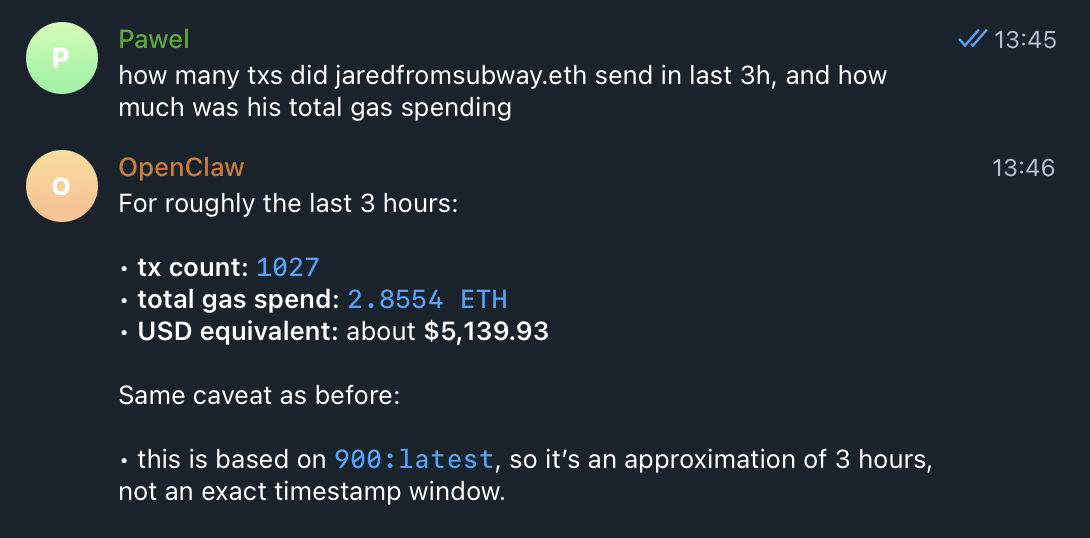
I find OpenClaw setup useful for running scheduled queries and reporting directly to a Telegram channel. You can configure cron tasks like:
- every 1h check and notify me if any transaction transferred more than 1 million USDC
- each day at 8AM send me a report on which 10 txs paid the most for gas in the last 24 hours
- how many txs did
jaredfromsubway.ethsend in the last 24h, and how much was his total gas spending
etc.
Summary
I wish I had access to similar tooling when I was full-time focused on building MEV bots some time ago. It would have saved me dozens of hours of manually querying blockchains for relevant txs. I hope you’ll find some of these techniques useful. Please send any feature requests or bug reports.
Also, stay tuned: I’m currently working on a major release of the mevlog CLI that will massively speed up and improve querying across large block ranges.